Tampilkan postingan dengan label BROSWER. Tampilkan semua postingan

Kamis, 19 Juli 2012

Mozilla Firefox 14.0.1 Final for Windows, Linux, and Mac

Mozilla Firefox 14.0.1 Final untuk Windows, Linux, dan Mac merupakan browser terbaru dari Mozilla yang dapat Anda gunakan untuk melakukan pencarian file/ data dan beragam fungsi lainnya yang tentu Anda sudah ketahui.


Changelog:

NEW:


Google searches now utilize HTTPS
Full screen support for Mac OS X Lion implemented
Plugins can now be configured to only load on click (requires an about:config change)
The Awesome Bar now auto-completes typed URLsCHANGED:


Improved site identity manager, to prevent spoofing of an SSL connection with faviconsDEVELOPER


Pointer Lock API implemented
New API to prevent your display from sleeping
New text-transform and font-variant CSS improvements for Turkic languages and GreekFIXED


Various security fixes
GIF animation can gets stuck when src and image size are changed (743598)
OS X: nsCocoaWindow::ConstrainPosition uses wrong screen in multi-display setup (752149)
CSS :hover regression when an element's class name is set by Javascript (758885)Download:


Mozilla Firefox 14.0.1 [English/Windows] (16 MB)
Mozilla Firefox 14.0.1 [Indonesia/Windows] (16 MB)
Mozilla Firefox 14.0.1 [Linux 32-bit] (17.5 MB)
Mozilla Firefox 14.0.1 [Linux 64-bit] (19.4 MB)
Mozilla Firefox 14.0.1 [Mac] (31 MB)

Selasa, 13 Maret 2012

Mozilla Firefox 11.0 Final Terbaru

Anda semua pasti sudah tak asing lagi dengan browser yang satu ini, kini Mozilla Firefox telah mengeluarkan versiterbarunya yaitu Mozilla Firefox 11.0 Final Terbaru. Mozilla Firefox 11.0 Final Terbaru 2012 adalah aplikasi browser yang simpel, modern, dan ringan serta memiliki beragam fitur seperti sangat cepat, aman, dan beragam fitur lainnya yang dapat Anda rasakan sendiri perbedaannya dari generasi ke generasi Mozilla Firefox.


Features:


Anti-Malware. Firefox protects you from viruses, worms, trojan horses and spyware delivered over the Web. If you accidentally access an attack site, it will warn you away from the site and tell you why it isn’t safe to use.
Anti-Phishing. Shop and do business safely on the Internet. Firefox gets a fresh update of web forgery sites 48 times in a day, so if you try to visit a fraudulent site that’s pretending to be a site you trust (like your bank), a browser message—big as life—will stop you.
Instant Web Site ID. Want to be extra sure about a site’s legitimacy before you make a purchase? Click on a site favicon for an instant identity overview. Another click digs deeper: how many times have you visited? Are your passwords saved? Check up on suspicious sites, avoid Web forgeries and make sure a site is what it claims to be.
Forget This Site. Having second thoughts about having visited a certain Web site? With this feature, you can remove every trace of that site from your browser—no questions asked!
Parental Controls. Enforce parental control settings you’ve entered on Windows 7 — stop unwanted downloads and more.
Outdated Plug-In Detection. Some web pages require that you install small applications called plugins to watch videos, play games or view documents. These plugins are written by other companies, and it can be hard to make sure they’re always up to date. Since outdated plugins are a security risk, Firefox will let you know when you have a plugin that’s vulnerable to attack and direct you to the right site to get the updated version. View our plugin check page.
Clear Recent History. Clear all your private data or just your activity over the past few hours with a few quick clicks. You have full control over what to delete, and then your info is gone for good—on your own computer or the one at your local library. It’s that easy.
Private Browsing. Sometimes it’s nice to go undercover, so turn this feature on and protect your browsing history. You can slip in and out of private browsing mode quickly, so it’s easy to go back to what you were doing before as if nothing ever happened. It’s great if you’re doing your online banking on a shared computer or checking email from an Internet café.
Customized Security Settings. Control the level of scrutiny you’d like Firefox to give a site and enter exceptions—sites that don’t need the third degree. Customize settings for passwords, cookies, loading images and installing add-ons for a fully empowered Web experience.
Add-ons. Firefox looks for a secure connection before installing or updating add-ons, 3rd party software, and Personas.
Anti-Virus Software. Firefox integrates elegantly with your Windows antivirus software. When you download a file, your computer’s antivirus program automatically checks it to protect you against viruses and other malware, which could otherwise attack your computer.Download:


Mozilla Firefox 11.0 (15.4 MB)

Google Chrome Terbaru 17.0.963.79 Stable [Offline Installer]

Beberapa waktu lalu Google mengadakan kontes bagi para hacker untuk membobol keamanan Google Chromedengan tujuan mencari celah bugs, dan ternyata ada seorang hacker yang mampu membobol keamanan Google Chrome yang sangat dibanggakan Google yaitu Sandbox Google Chrome sehingga para pengembangGoogle Chrome pun langsung memperbaiki celah keamanan yang berhasil ditembus tersebut. Hacker tersebut bernama PinkiePie, ia pun mendapatkan hadiah yang sangat besar dari Google yaitu uang $60.000.


Setelah celah keamanan tersebut berhasil diperbaiki Google pun kini mengeluarkan Google Chrome versi terbarunya yaitu Google Chrome Terbaru 17.0.963.79 Stable [Offline Installer]. Pasti Anda sudah sangat paham sekali dengan browser dari Google ini. Google Chrome adalah browser yang cepat, tangguh dan aman sehingga saya sendiri pun menjadikan Google Chrome sebagai browser favorit saya.


Download:


Google Chrome 17.0.963.79 Stable (23.5 MB)

Minggu, 05 Februari 2012

Avant Browser 2012 Build 21

Avant Browser 2012 Build 21


Avant Browser 2012 Build 21adalah sebuah web browser yang ultra cepat. Antarmukanya yang mudah digunakan membawa ke sebuah tingkatan baru dari kejernihan dan efisiensi untuk pengalaman browsing Anda, dan upgrade berkala secara terus-menerus memperbaiki kehandalannya.


Features:


No ADs, No Malwares!. Avant Browser is a freeware. 100% Free! No Ads, No Virus, No Spyware, No Malwares! Absolutly with no hidden cost to you ever.
Compatible with IE9. Avant Browser 2011 is fully compatible with IE9, which is so far the fastest browser engine on Windows platform.
Multi-Processing. Multi-Processing design offers you a crash-free internet browsing experience and high reliability. When one tab fails, it won't freeze the browser or pull other pages down.
Lowest Memory Usage Web Browser. Avant Browser is the lowest memory usage web browser on Windows platform. Memory usage is one of the most important factors to measure a browser's performance. We strived to avoid all possible memory leaks in Avant Browser and give you the best
Video Sniffer. Avant Browser can detect the videos in the web page you are browsing, and let you download them with just one click.
Download Accelerator. With Avant Browser's built-in multi-threaded downloader, it's much faster to download files from webpage or your email box, and much easier to manage download files.
Split View. Split view adds to Avant Browser’s multitasking functionality by providing an easy way to view multiple different web sites at the same time. Split view adds another dimension to Avant Browser’s customizable interface layout. Watching to online videos while reading the web news is a prime example of how Avant Browser’s split view interface can be used.
Detached Always on Top Browser Window. Detached browser window can be set on top of all other Windows applications, you can drag the tab button out of the tab bar to detach a browser window. This allows you to watch YouTube or chat with friends while you are working on other applications, like Word, AutoCAD etc.
Aero Glass UI. Avant Browser 2011 comes with a new skin theme called Aero Glass, which totally supports Windows 7's Aero Glass effects.
Private Browsing. Designed to set in a Private Mode, Avant Browser does not keep web data in your computer. So anybody else sharing the same computer with you will not be able to see which sites and which pages you have visited and which files you have displayed during your private web browsing section.
Anti-Freezing. The increasing usage of Ajax Technology in websites causes frequent freezing or crashes for most browsers. Avant Browser has developed a new technology to solve this problem, makes your surfing more fluent.
Fast, Low CPU usage. New dynamic multi-processing technology can effectively boost the browsing speed, save memory and reduce CPU usage significantly. Bring you fresh new experience.
No Memory Leak. As Ajax techniques become more popular, memory leak problem extensively exists in most browsers. Avant Browser new technology will release all occupied memory after a tab is closed.
Web Form Auto-Filler / Startup Login. One of the most useful features of Avant browser today is the AutoFill feature with which users can login a website by a single click, just like opening a bookmark. Avant Browser 2012 has taken this feature a step further by providing users the option to automatically login to any sites when Avant Browser startup. All web pages saved under [AutoFill->Startup] folder will be logged in automatically when Avant Browser startup.
Online Bookmarks. Access your Bookmarks with Avant Online Bookmarks Service from anywhere, office, home or an Internet cafe, and don't need to worry about losing those data when re-install windows.. The encrypted stand-alone bookmarks file format can protect your privacy on a shared computer.
Mouse Gestures. Got a big screen and tired of accurate clicks? With Mouse Gesture feature, you can control Avant Browser by “drawing” the command on the screen.
AD/Popup Blocker. AD/Popup Blocker can efficiently clean up the web pages by blocking Popup pages and filter Ad Content. You can block any annoy content by adding to the filter with the "Add to AD Black list" command in the Right-click Menu.
Real Full Screen Mode and Alternative Full Desktop Mode. When you enable Full Screen Mode, all you see is the webspace, with no toolbars or other clutter. They are simply autohidden! Move your mouse over the top or bottom and find the toolbar and tab bar respectively. Avant Browser also provides Full Desktop Mode, which is the same as Full screen mode, but differs in that your windows task bar stays visible.
Flash Animation Filter. Experiencing slow page loading with GPRS/3G connection? More than 85% of all flash animations on web pages are advertising. These flash files are pretty large, and normally take up to 90% of the size of the page you're visiting. With Avant Browser you can save the bandwidth by blocking the download of these flash files with just one easy click. Avant Browser also provides many options to block downloads of pictures, videos, sounds and ActiveX components. With these options users can control their bandwidth and speed up page loading.
RSS Reader. With Avant Browser, you can easily switch RSS view in Outlook headline mode or full-expended mode. You can also choose to be informed whenever there is an update to the RSS.
Multi-Document Interface. Wonder how to browse multiple web sites on your giant monitor? Avant’s unique MDI Interface makes this a dream come true!Download:


Avant Browser 2012 Build 21 (3.61 MB)
[Mirror]
[Mirror 2]
[Mirror 3]
Avant Browser 2012 Ultimate (18 MB)
[Mirror]
[Mirror 2]
[Mirror 3]

Opera 11.61 Build 1250 Final Terbaru

Opera 11.61 Build 1250 Final Terbaru


Opera 11.61 Build 1250 – Final adalahbrowser Opera final terbaru di tahun 2012ini dengan kemampuan jelajah yang cepat, aman, dan dapat disesuaikan dengan selera penggunanya. Persaingan browser sangat ketat, sehingga para pengembangpun kini terus memperbaiki dan membuat browser yang cepat dan aman untuk para penggunaya, salah satunya browser Opera terbaru ini. Opera sendiri dikenal sebagai browser tercepat fitur lengkap dan terkecil. Opera, pertama-tama, adalah klien World Wide Web, yaitu program untuk ekstraksi dari informasi dari WWW sebagai dokumen yang dibuat dengan bantuan HyperText Markup Language (bahasa yang menandai dari hypertext HTML). Persyaratan rendah untuk sumber daya sistem. MDI antarmuka. Anda dapat membuka khusus tanpa biaya apapun dari memori kuantitas jendela bekerja di dalam satu jendela, setelah dipilih sehingga modus tabulared atau kaskade. Gunakan Opera Turbo untuk menggandakan kecepatan download halaman Anda pada koneksi yang lambat. Download Opera sekarang dan mendapatkan lebih dari Web. Opera memungkinkan Anda surfing Internet dengan cara yang lebih aman, cepat, dan lebih mudah. Opera dilengkapi dengan beragam fitur canggih untuk mempercepat dan menjaga privasi online Anda. Opera kini telah support HTML 5 dan HTML 5 parser (Ragnarok).


Pada Opera 11.61 Build 1250 Final Terbaru, pengembang Opera lebih meningkatkan tingkat keamanan dan kestabilan Opera sehingga Anda akan lebih nyaman dalam berselanjar di internet menggunakan Browser Opera.

Download:


Opera 11.61 Build 1250 Multilingual [Windows] (10.13 MB)
[Mirror]
Opera 11.61 Build 1250 English [Windows] (7.7 MB)
[Mirror]

Opera 11.61 Build 1250 [Linux] (14.15 MB)
[Mirror]

Opera 11.61 Build 1250 [Mac] (13.56)
[Mirror]

Selasa, 31 Januari 2012

Download Google Chrome 16.0.912.75 Stable Offline Installer

Download Google Chrome 16.0.912.75 Stable Offline Installer


Google Chrome 16.0.912.75 Stable Offline Installermerupakan versi terbaru yang dapat diinstal secara offline (tanpa koneksi internet). Google Chrome 16.0.912.75dirancang agar dapat membuka website lebih cepat, stabil dan aman. Dengan tampilan yang minimalis dan efisien tentunya akan memudahkan penggunanya dalam melakukan surfing di dunia maya. Google Chrome mengalami perkembangan yang cukup cepat dan semakin populer bagi para pengguna internet. Saat ini, hampir setiap 6 minggu sekali Google merilis versi Chrome terbaru. Google Chrome 16.0.912.75 Stable juga merupakan penyempurnaan dari versi sebelumnya.

Google Chrome 16.0.912.75 Stable menawarkan stabilitas dan tingkat keamanan yang tinggi. Di dalamnya terdapat aplikasi built-in seperti PDF Reader dan Flash Player yang secara otomatis akan diperbarui setiap rilis versi terbaru dan bekerja dalam mode sandbox (terisolasi) untuk menjaga keselamatan dan keamanan. Google Chrome 16.0.912.75 Stable juga terintegrasi dengan Google Translate, yang secara otomatis dapat menerjemahkan sebuah halaman web.

Fitur baru yang ditawarkan oleh Google Chrome 16.0.912.75 Stable adalahfitur multi account Gmail. Di dalam browser ini memungkinkan untuk dapat memiliki lebih dari satu akun Google dan dapat dengan mudah beralih dari satu akun ke akun yang lain tanpa harus melakukan hal-hal yang mengganggu seperti sign in atau sign out. Anda cukup menekan tombol pada sudut kiri atas, maka secara otomatis akan dialihkan ke account Google Anda yang lain. Namun fitur ini lebih baik digunakan untuk komputer pribadi atau komputer yang hanya digunakan oleh orang-orang yang Anda percaya. Karena jika fitur multi account diaktifkan, tentunya tingkat keamanan akan lebih berkurang. Dengan kata lain orang lain bisa saja menggunakan account Google Anda.


Dibanding browser yang lain, sistem JavaScript yang baru pada Google Chrome 16.0.912.75 lebih cepat cara kerjanya dan lebih melindungi kita dari situs-situs yang berpotensi berbahaya (terdapat malware didalamnya).


(23.13 MB)

Download Google Chrome 16.0.912.75 Portable
(1.38 MB)

Download Firefox

Mozilla Firefox Adds Twitter Search and New Features that Make Web Browsing Easier

Today, we’re releasing an update to Firefox for Windows, Mac, Linux and Firefox for Android. This update includes new features that make Web browsing easier and give users and developers more control over how they customize their Web experience.
Firefox for Mac, Windows and Linux
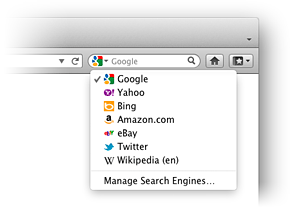
Twitter is now included as a search option in Firefox for Windows, Mac and Linux. Twitter search in Firefox makes it easier to discover new topics, #hashtags and @usernames. Twitter search is currently available in English, Portuguese, Slovenian and Japanese versions of Firefox, with more languages to come in future releases.
Firefox lets you load tabs on demand, making it much faster to restore windows with many tabs. Enable this option in the Firefox Menu, under Options/Preferences, in the General tab.
Sometimes you download third-party software and are surprised to discover that an add-on has also installed itself in your browser without asking permission. At Mozilla, we think you should be in control, so we are disabling add-ons installed by third parties without your permission and letting you pick the ones you want to keep.
Mozilla pioneered WebGL and introduced it in Firefox earlier this year. WebGL is a new Web standard that allows websites and Web apps to display hardware-accelerated 3D graphics without third-party software. Firefox adds support for Cross-Origin Resource Sharing (CORS), which lets developers load WebGL textures from other domains in a secure way. To see an example of WebGL in action, visit Google MapsGL and experience 3D maps in Firefox.
Mozilla is a leader in HTML5 and we want to make it easier for developers to create amazing Web experiences. Using simple HTML5 markup, Firefox enables Web developers to customize the options users have in the right click menu and saves them from having to build their own menu. If you’re a Web developer and want to learn more about the awesome features we build into Firefox, just for you, click here.
Firefox for Android
Firefox for Android has new features that put users in control of their mobile Web experience. With Firefox Master Password, you can protect all your saved usernames and passwords. This will help your private info stay private if you ever share or lose your Android device.
We want to make HTML5-based Web apps as easy to use as native apps. Firefox lets Android users add icons for any bookmarked website or Web app to the home screen and launch with just one touch.
Klik Here DOWNLOAD

 
Design by Free WordPress Themes | Bloggerized by Lasantha - Premium Blogger Themes | Best Buy Coupons